“Quick Summary: No, you cannot natively upload video files directly into OpenAI Codex.
Because Codex is structured as a text- and code-reasoning AI agent environment rather than a media storage cloud or graphical timeline editor, heavy binary formats (such as .mp4, .mov, or .webm) cannot be ingested as raw tokens. However, developers frequently use Codex to write, debug, and automate script-driven video processing pipelines locally using tools like FFmpeg, Python, and the Codex CLI or desktop app.“
Introduction
As artificial intelligence platforms bridge software development, engineering, and multimedia workflows, developers often look to merge coding agents with media pipelines. If you are typing “can i upload videos to codex” into a search engine or AI prompt, you are likely trying to figure out how to handle heavy media assets within a text-centric development environment.
Understanding how OpenAI Codex handles media requires looking closely at its architecture, distinguishing it from general multimodal chat interfaces, and reviewing how local script execution bridges the gap.
1. OpenAI Codex’s Native Media Capabilities: The Technical Reality
To evaluate whether video uploads work, it helps to examine what Codex is built to process:
Token-Based Text and Syntax Processing: OpenAI Codex is trained to interpret, generate, and debug programming syntax across dozens of languages (such as Python, JavaScript, and Rust). It evaluates logic through text tokens, not pixel grids.
The Binary File Barrier: Binary media files—including
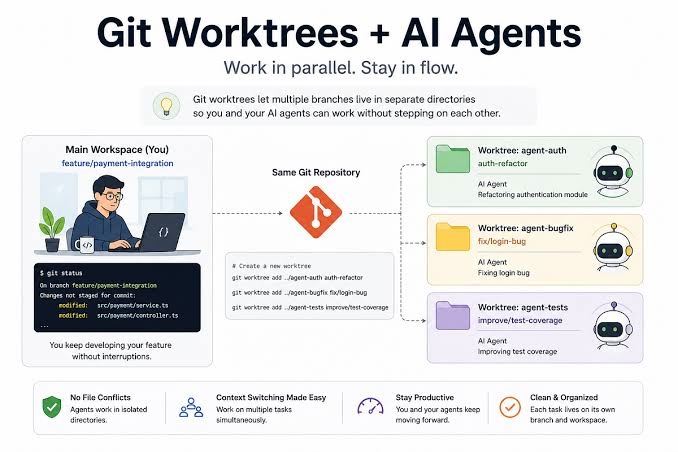
.mp4,.mov, and.webmvideos—cannot be ingested directly as text tokens into a code-generation context window. While consumer-facing chat interfaces sometimes accept limited compressed images or short audio clips for visual inspection, video files impose heavy bandwidth, decoding overhead, and token context limits.Codex vs. Multimodal Chat Interfaces: A common point of confusion is mistaking developer-focused code agents for consumer chat platforms. While everyday web chat tools handle various documents, developer environments prioritize code repositories, configuration files, worktrees, and terminal execution paths.
2. How Developers Process Videos Using Codex (Real-World Workflows)
Because Codex cannot act as a cloud video host or graphical timeline editor, technical professionals use two primary workflow patterns to accomplish video-related tasks:
Approach A: Script-Driven Video Processing (FFmpeg, Python, and Node.js)
Instead of uploading a heavy video file into an AI interface, the industry standard is to have Codex write the automation code that processes videos locally on your machine. By combining Codex with command-line utilities like FFmpeg and script libraries (such as Python’s MoviePy or OpenCV), you can orchestrate complex batch video transformations using natural language.
Example Prompt for Codex:
“Write a robust Python script using FFmpeg that scans a local directory for incoming .mp4 files, normalizes audio tracks to -16 LUFS, trims trailing silence, and outputs a web-optimized 1080p stream.“
Codex generates clean, production-ready code tailored to your operating system, which you execute locally where your heavy files reside.
Approach B: Integrating Media APIs and Agent Extensions
Advanced development environments and agent frameworks allow engineers to plug external tools into their workspace:
By linking cloud video transcoding and rendering APIs (such as AWS Elemental MediaConvert, Shotstack, or Cloudinary), you can prompt Codex to write the API integration layer.
In this architecture, Codex acts as the orchestrator and programmer, writing payload structures and webhook handlers, while specialized cloud infrastructure handles the heavy video bytes.

3. Step-by-Step Guide: Automating Video Workflows with Codex
If you have a video processing project and want to use Codex to generate the code infrastructure, follow this structural workflow:
Audit Your Local Toolchain: Ensure you have local developer utilities installed, such as FFmpeg for command-line manipulation and the required runtime (Python or Node.js).
Define Technical Specifications: Clearly specify your input formats (e.g., 4K H.264), target outputs (e.g., vertical 9:16 vertical clips for social media), and performance constraints.
Prompt Codex for the Pipeline Script: Ask Codex to write the script or configuration file handling batch tasks like renaming, watermarking, format conversion, or thumbnail frame extraction.
Execute Locally: Run the generated script securely on your local machine or staging server. This keeps massive file transfers out of your network connection and chat windows.
4. Best Practices, Security, and Limitations
Keep Heavy Files Local: Never attempt to bulk-dump large video files into code text prompts. Always reference local file paths or environment variables pointing to your local directories.
Understand Where Processing Happens: Video encoding, rendering, and transcoding require heavy CPU and GPU computing power. Codex provides the logic, scripts, and debugging help, but your local machine or cloud compute instance executes the rendering.
Data Privacy: Processing client footage or proprietary screencasts via local scripts written by Codex ensures that your raw media files never leave your hardware, maintaining strict compliance and security.
Conclusion
Can you upload videos to Codex? Natively, no—Codex is engineered as a code-generation and software agent environment, not a media storage cloud or a graphical video editor. However, Codex serves as a powerful accelerator for automating video processing workflows through precise Python, shell, or FFmpeg scripts, allowing you to build robust, repeatable media pipelines using plain English.