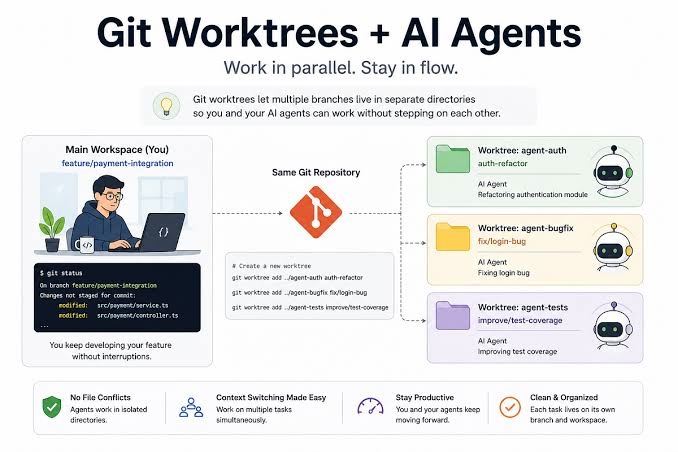
“Quick Summary: In OpenAI Codex, a worktree is an isolated secondary checkout of your Git repository mapped to a specific chat or task thread. Instead of forcing an AI coding agent to modify files in your active local workspace (Local), Codex creates a separate, sandboxed working directory that shares the exact same .git object history. This allows developers to run multiple parallel background tasks, bug fixes, and feature implementations simultaneously without risking file overwrites, uncommitted state collisions, or merge chaos.”
Introduction
As developer workflows shift from single-threaded prompting to autonomous, multi-agent engineering, managing context and file states has become the primary bottleneck. If you are typing “what is worktree in codex” into your search bar, you are likely exploring how modern AI coding tools handle simultaneous tasks across the same repository.
Understanding Codex worktrees is essential for anyone looking to scale their productivity. This guide breaks down the underlying Git architecture, contrasts foreground workspaces with background worktrees, explains how to use them across both the desktop app and CLI, and details best practices for clean parallel development.
1. What Exactly is a Worktree in Codex?
To understand a Codex worktree, we have to look under the hood at Git worktrees, which provide the foundational architecture for the feature.
The Core Mechanism: A Git worktree allows a single repository to have multiple working trees checked out at the same time. They all share the exact same
.gitrepository metadata, history, branches, and objects, but each worktree maintains its own unique directory path and file checkout state.Local vs. Worktree: In your Codex environment, your primary workspace is your active local directory (
Local). When you initiate a complex task or background prompt, Codex can spin up a Worktree—an isolated sandbox directory.Why AI Agents Require Isolation: Autonomous coding agents frequently write, test, and modify files. If multiple agents or threads attempt to mutate the same uncommitted files in a single local directory, code gets overwritten or corrupted. Worktree isolation guarantees that each AI thread operates in its own pristine sandbox, leaving your primary workspace untouched until you are ready to review and merge.
2. How Codex Worktrees Work Under the Hood
The mechanics of how Codex manages these isolated environments involve precise filesystem and branch operations:
Managed Paths: Codex typically provisions worktrees in structured background directories (such as under a hidden
.codex/worktrees/directory or system-managed temporary paths), keeping your root folder clean.Detached HEADs and Dynamic Branch Creation: When a new worktree session starts, Codex can check out an existing branch or spin up a dedicated ephemeral branch (e.g.,
codex/task-xyz). This ensures changes remain cleanly isolated from whatever branch you currently have checked out in your main terminal.Handling Ignored Files (
.gitignore): Because worktrees are separate checkouts, large build artifacts,node_modules, or environment configurations (.env) inside your main folder are not automatically duplicated. Codex handles dependency bootstrapping or requires configuration guidelines (agents.md) to ensure the sandboxed environment has access to necessary local context.
3. How to Use Worktrees in Codex (App & CLI Methods)
Depending on your preferred environment, you can trigger and manage Codex worktrees through either the desktop application interface or the command-line interface.
Method A: The Codex Desktop App UI
If you use the Codex desktop application:
Navigate to the composer or prompt input box where you define your engineering task.
Select the Worktree option (often found in environment or target dropdowns) rather than running directly in your primary local state.
Choose your starting branch. Codex will automatically provision a background workspace, execute the coding tasks, run tests, and present a clean handoff state once complete.
Method B: The Codex CLI & TUI
For terminal-first power users:
Use command flags like
--worktreewhen kicking off a new task (codex --worktree "Refactor the authentication middleware").Utilize interactive Terminal User Interface (TUI) pickers (such as typing
/newor/forkin the chat session) to instantly fork your current state into a new isolated worktree thread.
4. Best Practices for Parallel Development with Codex Worktrees
To get the most out of your multi-agent workflows without cluttering your system, follow these proven best practices:
Keep Tasks Strictly Independent: Assign isolated features or self-contained bug fixes to separate worktrees. Avoid having two background threads modify overlapping database schemas or identical core modules simultaneously to prevent complex merge conflicts.
Bootstrap Dependencies Promptly: Remember that sandboxed worktrees start fresh. If your code requires specific local packages or environment setup, instruct Codex in your initial prompt to run package managers (like
npm ci,pip install, orbundle install) inside the worktree setup hook.Perform Regular Garbage Collection: Over time, abandoned worktrees can accumulate disk space. Periodically check and clean up your local repository state using native Git commands:
Bash
git worktree list
git worktree prune
This ensures your local disk stays lean and free of stale agent artifacts.
Conclusion
A worktree in Codex is much more than just a technical feature—it is the foundational mechanism that enables true parallel AI-assisted software engineering. By isolating background chat threads into separate Git worktrees, Codex lets you generate code, fix bugs, and refactor applications concurrently without disrupting your primary workspace.
Frequently Asked Questions (FAQs)
Does a Codex worktree duplicate my entire repository history?
No. Because worktrees share the underlying .git object database and history stack, they do not duplicate git history. They only check out the specific working files for that thread, saving immense disk space compared to full repository cloning.
Will changes made in a Codex worktree affect my main local branch?
No. Changes are completely isolated to the sandboxed worktree directory and its assigned branch. Your primary local workspace remains completely untouched until you explicitly review, commit, and merge the changes.
How do I clean up old or abandoned Codex worktrees?
You can view all active worktrees using git worktree list in your terminal. To clean up stale references or pruned worktree directories automatically, run git worktree prune.