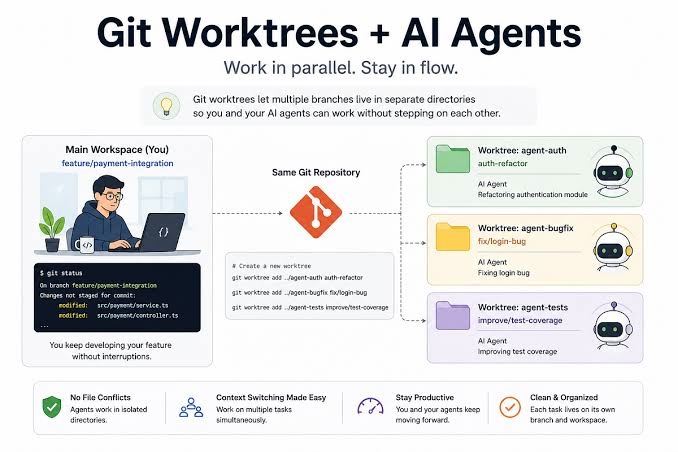
Quick Summary: Running multiple AI coding agents (such as Codex, Claude Code, or Aider) concurrently in a single repository often leads to file overwrites, conflicting uncommitted states, and broken build caches. By leveraging Git worktrees, you can provision physically separate, sandboxed working directories for each agent while sharing a single underlying .git history database. This comprehensive guide covers environmental setup, resource isolation, monitoring command centers, and clean merge strategies for multi-agent workflows.
Introduction
As engineering teams shift from single-threaded prompting to autonomous, multi-agent development workflows, managing codebases has reached an inflection point. Traditional software development assumes a human developer working sequentially in one directory. When multiple AI coding agents run simultaneously in the same workspace, they fight over branch checkouts, overwrite each other’s edits, and collide on uncommitted changes.
Mastering How to Manage Multiple AI Agents with Git Worktrees is essential for scaling your engineering throughput. This guide explores why standard workspaces break under multi-agent pressure, how Git worktrees solve the file-collision bottleneck, and how to build a robust, conflict-free AI development pipeline.
1. Why AI Agents Break Standard Development Workflows
To understand the value of worktrees, we first need to look at the structural limitations of running concurrent agents in a traditional single-directory setup:
The Single-Directory Bottleneck: When Agent A is refactoring a database schema and Agent B is writing API endpoints in the exact same local folder, they mutate the same files and uncommitted state simultaneously. This results in corrupt edits and lost code.
Why Branching Alone Isn’t Enough: While Git branches manage version control and history separation, standard branch switching requires a single working tree. If you switch branches while an agent is mid-task, you disrupt its context and working files.
The “One Task, One Branch, One Worktree, One Agent” Principle: To achieve true parallel productivity, each autonomous agent must operate in its own completely isolated physical directory tied to its own distinct branch. This architectural rule guarantees zero file interference.
2. Setting Up Your Multi-Agent Worktree Environment
Implementing a multi-agent structure requires setting up your repository directories to accommodate sibling worktrees cleanly without cluttering your main project root.
Step 1: Structuring Your Directory Layout
Instead of nesting worktrees inside your main repository folder (which can cause recursive git status confusion), place them as sibling directories outside your primary repo root, or inside a dedicated .agents/ workspace folder managed by your project setup.
Step 2: Creating Worktrees with Git Commands
You can provision a new sandboxed worktree for an AI task using the native Git CLI. For example, to create a worktree on a new feature branch in a sibling folder:
git worktree add ../project-agent-auth feature/oauth-refactorThis command checks out the branch feature/oauth-refactor into a brand-new directory located at ../project-agent-auth, while linking it seamlessly to your main .git repository metadata.
Step 3: Bootstrapping Dependencies and Environment Files
Because worktrees are pristine checkouts, they do not automatically inherit uncommitted local assets like .env files, build caches, or node_modules.
Instruct your automation setup or script a quick hook to copy necessary configuration files (
.env.test, local config templates) into each new worktree.Run package managers (
npm ci,pip install) independently inside each worktree directory to ensure the agent has a fully functional runtime environment.
3. Solving the Hidden Shared-Resource Traps (Ports & Databases)
While Git worktrees successfully isolate your source code files, they do not isolate machine-level resources. If you run two AI agents simultaneously that both try to spin up a local development server on port 3000 or connect to the same default SQLite/PostgreSQL database, you will encounter runtime crashes and test pollution.
Dynamic Port Allocation: Configure your test scripts or application startup commands to accept dynamic or environment-driven ports (e.g.,
PORT=3001 npm run devfor Agent A andPORT=3002for Agent B).Isolated Database Schemas: Ensure database migrations and tests run against separate database names, distinct schema prefixes, or isolated containerized instances (such as ephemeral Docker containers) per worktree to prevent data corruption.
4. Building an Agent Command Center (Monitoring & Merging)
Running multiple autonomous agents requires visibility and control. Professional developers use terminal multiplexers and disciplined merge pipelines to oversee their fleet of agents.
Using
tmuxfor Multi-Agent Monitoring: A terminal multiplexer liketmuxallows you to split your terminal screen into a grid, running each agent in its own isolated worktree directory side-by-side. You can monitor progress, review error logs, and inspect real-time outputs at a glance.Enforcing Test Gating: Before accepting code from any agent worktree, enforce rigorous automated test gating (
npm test,pytest, or lint checks) locally within that specific worktree directory.The Serialized Merge Pattern: Never merge multiple AI branches simultaneously without verification. Rebase or merge your agent branches into your main development branch one by one, addressing integration conflicts incrementally to maintain a clean git history.
5. Maintenance and Hygiene: Pruning and Cleanup
Autonomous agent workflows generate temporary branches and worktree folders rapidly. Left unmanaged, stale worktrees consume valuable disk space. Maintain a clean development environment using native Git cleanup commands:
List Active Worktrees:
git worktree list- Remove a Completed Worktree:
git worktree remove ../project-agent-auth- Prune Stale References: If worktree folders were manually deleted, clean up orphaned administrative metadata by running:
git worktree pruneConclusion
Managing multiple AI agents with Git worktrees is the ultimate unlock for high-velocity software engineering. By providing each autonomous agent with its own sandboxed physical directory, isolating machine resources, and maintaining disciplined merge practices, you can scale your parallel workflows without ever risking your primary workspace.
Frequently Asked Questions (FAQs)
Do Git worktrees duplicate my repository’s history?
No. All worktrees share the exact same underlying .git object database and history stack. They only check out the specific working files for that directory, meaning they consume virtually zero extra disk space compared to cloning a repository multiple times.
Can different agents work on the same branch across different worktrees?
No. Git strictly forbids checking out the same branch in multiple active worktrees simultaneously to prevent conflicting edits. Each worktree must map to a unique branch name.
How do I handle large dependencies like node_modules in worktrees?
To avoid duplicating heavy dependency folders across multiple worktrees, you can use package manager caching strategies, symlink shared cache directories, or automate quick installation scripts during your worktree provisioning phase.